 Vanoor
Guide
A running app without an Apple Watch: what an iPhone alone can do
On this page
Plenty of runners own an iPhone and no Apple Watch. Most running apps still treat the phone as the thing that sends routes to the wrist. If the phone is all you have, you want to know what it can do by itself: follow a route and tell you where to turn, keep you on pace, and talk you through an interval session, ideally without a monthly fee.
This guide covers what an iPhone handles well on a run, where it struggles, what to look for in an app, and how to set up a run in Vanoor, which records runs on the iPhone alone on iOS 26 and later.
Do you need an Apple Watch to run with an app?
No. An iPhone has GPS, a motion sensor that counts your steps, and a Bluetooth link to your headphones. That covers distance, pace, cadence, a map and spoken cues. Apple's Fitness app, Strava and most running apps can record a run from the iPhone.
Two things are missing. The phone has no heart-rate sensor, and you can't glance at it the way you glance at a wrist. Both have workarounds, and the rest of this guide is mostly about them.
What an iPhone does well on a run, and where it struggles
GPS in a pocket or an armband
Under open sky, phone GPS is typically accurate to within about 5 metres, according to the US government's GPS site. Near tall buildings, under bridges and among trees it gets worse, for a phone and a watch alike. Where the phone sits on your body matters less than what is above you: a pocket, an armband or a running belt all work. Distance over a whole run usually comes out close. The pace for any single moment jumps around more, which is why running apps smooth it.
Battery
GPS, a bright screen and streamed music are the big drains. A run with the screen locked and the playlist downloaded uses much less than one with the map lit up the whole way. For a long run, start with a full charge, download your music, and keep the screen off between looks.
Heart rate needs a sensor
The iPhone can't measure your pulse. You need a Bluetooth chest strap, or AirPods Pro 3, which Apple says measure heart rate during workouts and show it in the Fitness app and in third-party workout apps. Without either, you still get pace, distance and cadence. Check which sensors an app accepts before you buy one.
In your hand or on your body
Holding the phone for an hour is tiring, and it is easy to drop. An armband or a running belt keeps your hands free and still lets you take the phone out at a junction. Once the phone is put away, though, you need the app to talk to you.
Spoken cues do the looking for you
With a phone in a belt you won't check the screen every few minutes, so spoken cues in your headphones carry the run: the kilometre and your pace, the next interval as it starts, and on a route, the next turn before you reach it. Good cues are short, and your music gets quieter while they speak instead of stopping.
What to look for in an iPhone running app
- Turn-by-turn on your own route. Many apps draw a GPX line on a map. Fewer call out the turns of that line, and with the phone in a pocket, that is the part you need.
- Spoken cues you switch on one at a time, so you can hear the turns and the kilometres and skip the rest.
- Workouts with targets: a warm-up, repeats and recoveries, each with a pace or heart-rate range, announced as each step starts. Apple's custom workout builder needs an Apple Watch, so on a phone alone you need an app that does this itself.
- Something on the lock screen, so checking your pace doesn't mean unlocking the phone.
- Support for a Bluetooth chest strap, if you care about heart rate.
- Where your runs end up: Apple Health, Strava, or both.
- The price model. Many navigation and training apps are subscriptions. If you only want guided runs, a one-time purchase usually costs less over a couple of years.
How to run with Vanoor on an iPhone alone
Vanoor started as an Apple Watch app. Since version 1.5 it also records runs on the iPhone by itself, on iOS 26 or later. The routes, workouts and settings are the ones a Watch would use.
- Get a route in, if you want one. Import a GPX file from Files, Mail, AirDrop or Safari, or draw a route in the planner (see importing a GPX and drawing a route).
- Choose what you want to hear. In Settings → Alerts, switch on the spoken cues you want: kilometres, laps, workout splits, turns, fuel and off route. They all start off.
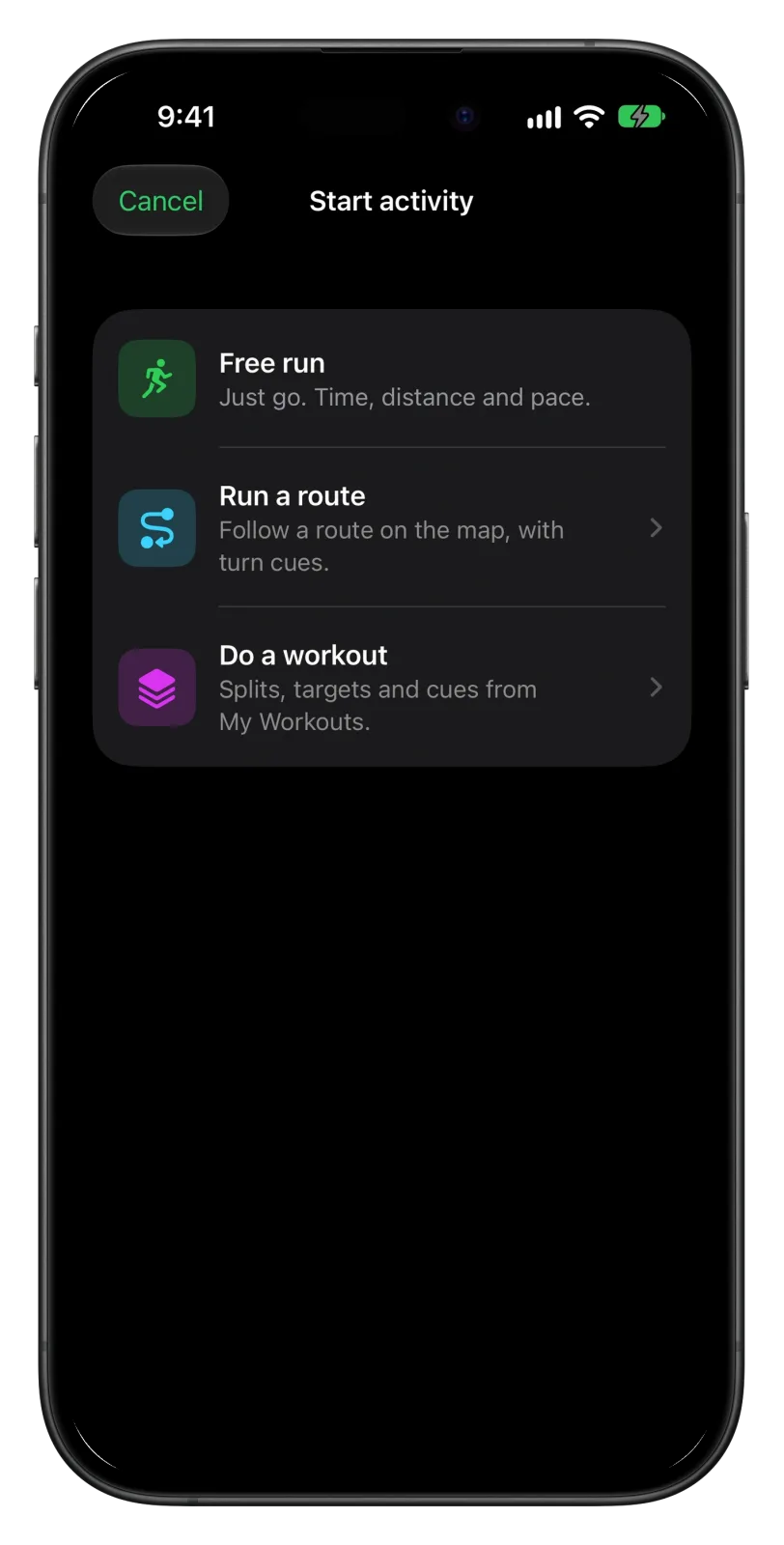
- Tap Start activity on Home and pick Free run, Run a route or Do a workout. The button next to Start switches between Run, Walk and Hike.
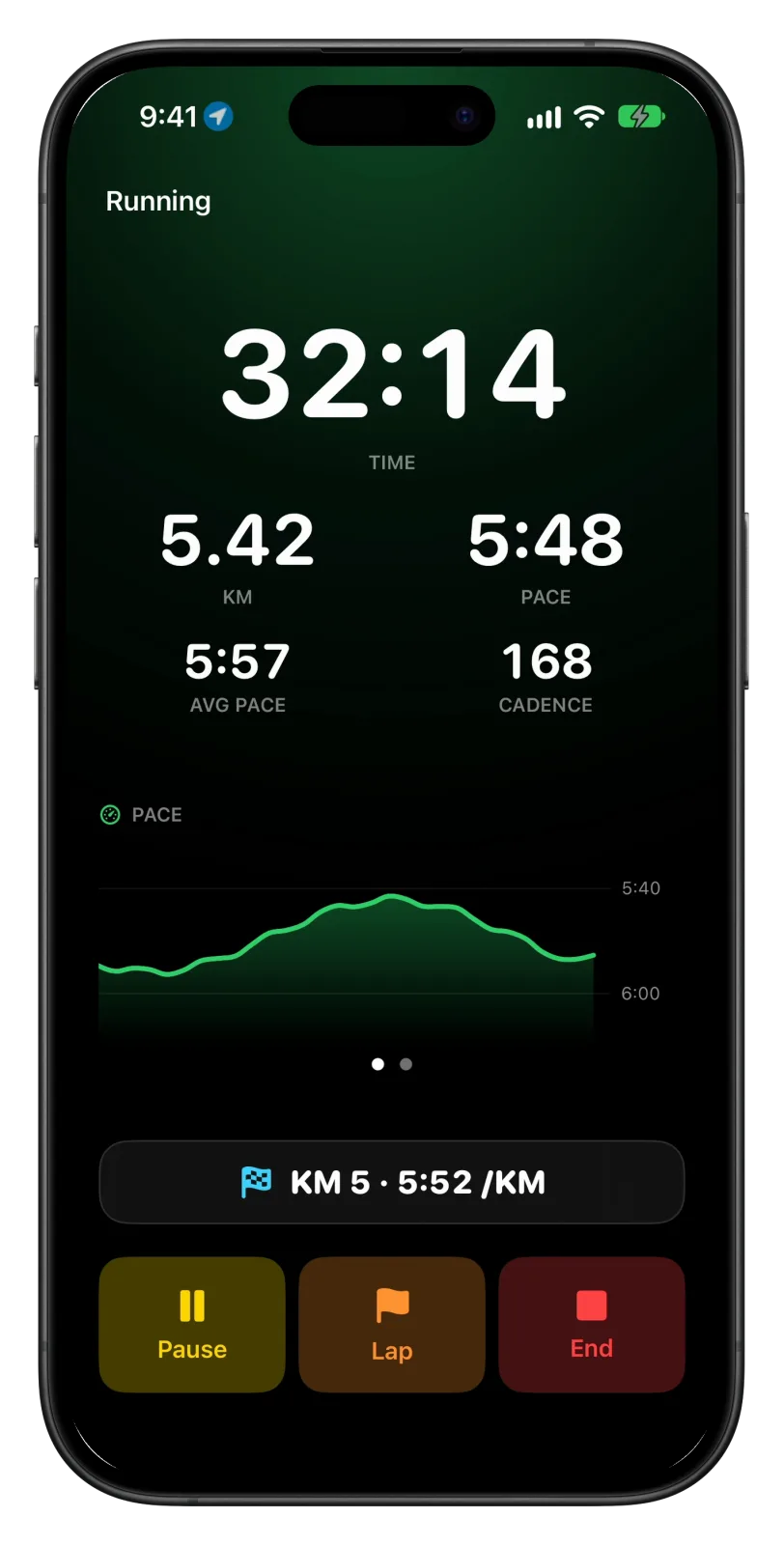
- Tap Start and put the phone away. The run begins after a short countdown, and time, distance and pace stay on the lock screen as a Live Activity.
- When you are done, tap End, then Save. The run goes to Apple Health, to your Vanoor history and to Strava if you connected it.
Following a route
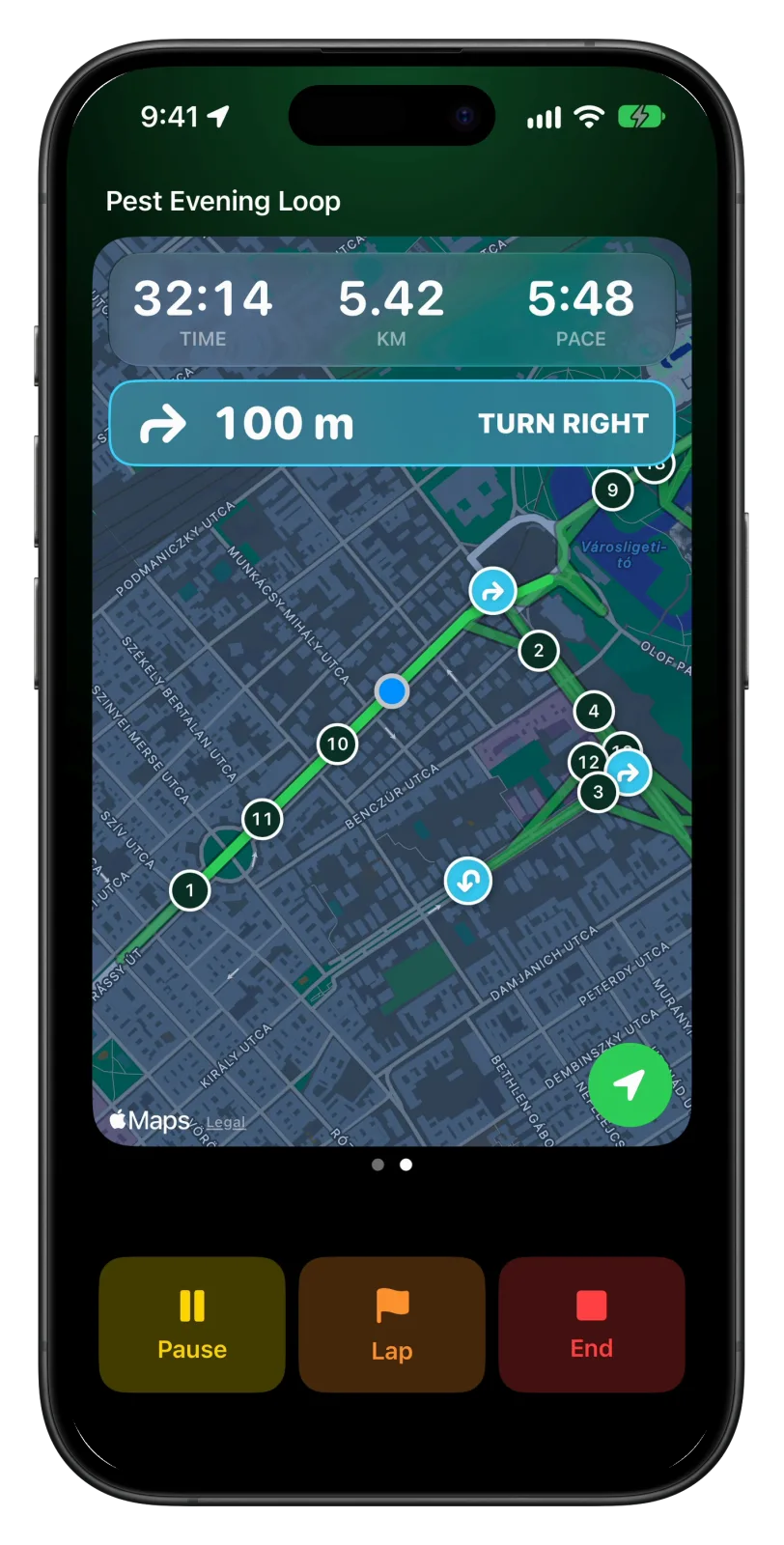
Vanoor finds the turns on the iPhone when you save the route. During the run, swipe left to the map. It shows the route with kilometre markers and a card for the next turn with the distance to it, and the turn cue says the same thing in your headphones. If you stray more than 40 metres from the line, an Off route label shows how far away you are. Back to Start, on the same page, leads you home along the way you came. How the turns are picked is explained in turn-by-turn directions for running.
Running a workout or a race plan
Do a workout lists your saved workouts from My Workouts, plus a few starter run/walk plans for beginners. On a workout, the top of the data page shows the split you are in, its target band and how much of it is left, and each new split is announced as it starts. A race plan made in Vanoor's race planner is saved in My Workouts too, so you run it the same way, with a target pace for each section of the course. To work out the paces first, try the pace calculator.
Heart rate, signal and the unexpected
Pair a Bluetooth chest strap in Settings → Heart-rate sensor. Its readings go into the workout in Apple Health, so you get average heart rate and zones. Tap the live chart to switch it between pace and heart rate. If the GPS signal drops for 20 seconds, a voice tells you, and tells you again when it is back. If iOS closes the app in the middle of a run, open it again and the run carries on.
Every screen and setting, step by step, is in the guide to running with only your iPhone. For the full list of what each cue says, see voice cues for running; the switches are the same on the phone.
What you give up without a Watch
- Heart rate without extra gear. A Watch reads it from your wrist; the phone needs a strap.
- Running form numbers. Power, ground contact time and stride length come from the Watch, so Vanoor doesn't record them on iPhone runs.
- A tap on the wrist. A Watch taps you before a turn or a new split, which works even without headphones.
- Leaving the phone at home. With a Watch, the phone can stay behind (see running without your phone).
When a Watch is worth adding
If you run a few times a week with headphones in, the iPhone alone covers routes, workouts and race pacing well. A Watch starts to pay off when you want heart rate without a strap, want to feel cues instead of hearing them, or would rather leave the phone at home on long runs. With Vanoor you don't have to decide now. Routes, workouts, race plans and settings are shared, so a Watch you add later already has everything on it.
Common questions
Can I use a running app without an Apple Watch?
Yes. Most running apps record a run from the iPhone alone. Check that the one you pick speaks its cues, since you won't be looking at the screen much.
Is there a turn-by-turn running app for iPhone?
Vanoor calls out the turns of your own GPX route on the iPhone alone, on iOS 26 or later: a card on the map and a spoken line in your headphones before each turn. Apple Maps also gives spoken walking directions, though it plans its own way and runs outside your workout.
Do I need a chest strap?
Only for heart rate. Pace, distance, cadence, the map and the spoken cues all work without one. In Vanoor, pair a strap in Settings → Heart-rate sensor.
Does Vanoor need a subscription?
No. It costs $14.99 once after a 7-day free trial, with no account. Runs with the iPhone alone need iOS 26 or later.
Sources
- U.S. Space Force / GPS.gov. GPS Accuracy: GPS-enabled smartphones are typically accurate to within a 4.9 m radius under open sky, worse near buildings, bridges and trees. archive.gps.gov
- Apple. Track your heart rate during workouts with AirPods Pro 3 (AirPods User Guide): heart rate in the Fitness app on iPhone and in third-party workout apps. support.apple.com
- Apple. Customize a workout in Fitness on iPhone (iPhone User Guide): custom workouts, Pacer and Race Route; requires an Apple Watch with watchOS 26 or later. support.apple.com
Read on 13 October 2026.
Related guides
Picked by shared topics.
Your iPhone is enough to start.
Vanoor: routes with spoken turn cues, race pacing and structured workouts on your iPhone alone (iOS 26), and on Apple Watch when you get one.
Get Vanoor on the App Store 7-day free trial · $14.99 once, no subscription · no account