 Vanoor
Guide
Run without your phone: Apple Watch route navigation that works with no signal
On this page
- What has to be on the Watch before you leave
- What navigation looks like on the wrist
- Which Apple Watch models can do this?
- Honest limits
- The phone-free checklist
- Does GPS get worse without the phone?
- What you give up
- Battery on a phone-free run
- Running without your phone: quick answers
- Why not just carry the phone?
- Sources
The best reason to own an Apple Watch as a runner is the one Apple rarely advertises: you can leave the phone at home. GPS, heart rate and music all live on the wrist, and with the right app so does a route to follow. This guide is about that last part: what an Apple Watch needs so that running navigation works with no iPhone and no signal, and what it looks like once it does.
What has to be on the Watch before you leave
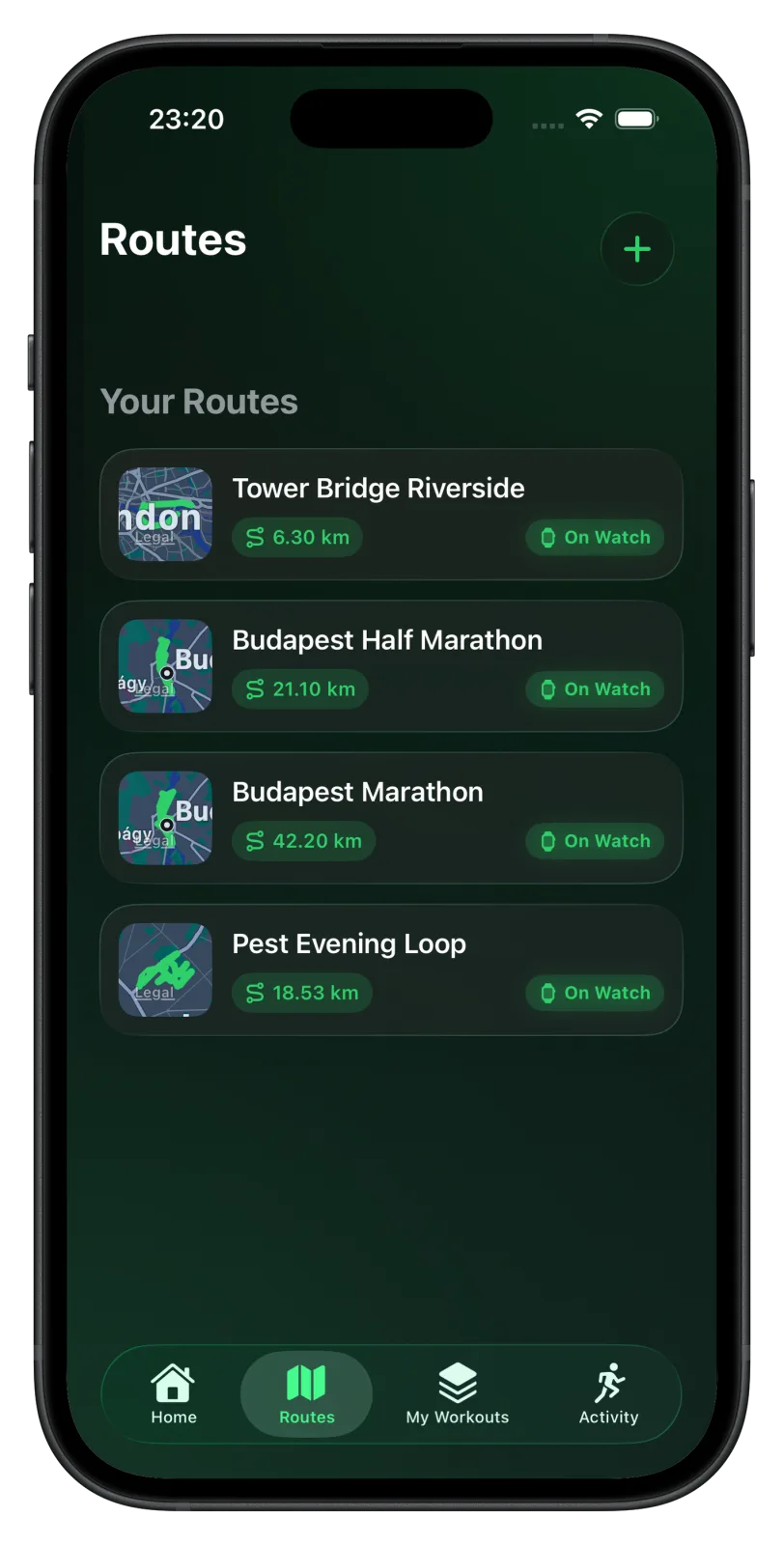
- The route itself. A GPX you imported or a route you drew on the iPhone (see how to import a GPX to Apple Watch). Vanoor syncs it to the Watch automatically over the paired connection.
- The map along the route. A Watch cannot fetch map tiles from the trail. Set Map on Watch to Offline in Vanoor's Settings and the iPhone pre-renders a strip of Apple Maps along each route and sends it with the route, so the map is already on the wrist when you start. The route line and your position work without it; the tiles are the picture underneath. Details in the offline maps guide.
- Your plan, if you have one. A pacing plan or interval workout attached to the route travels with it. Nothing is fetched mid-run.
Check the "On Watch" state in the route list; if it is there, you can leave the phone.
What navigation looks like on the wrist
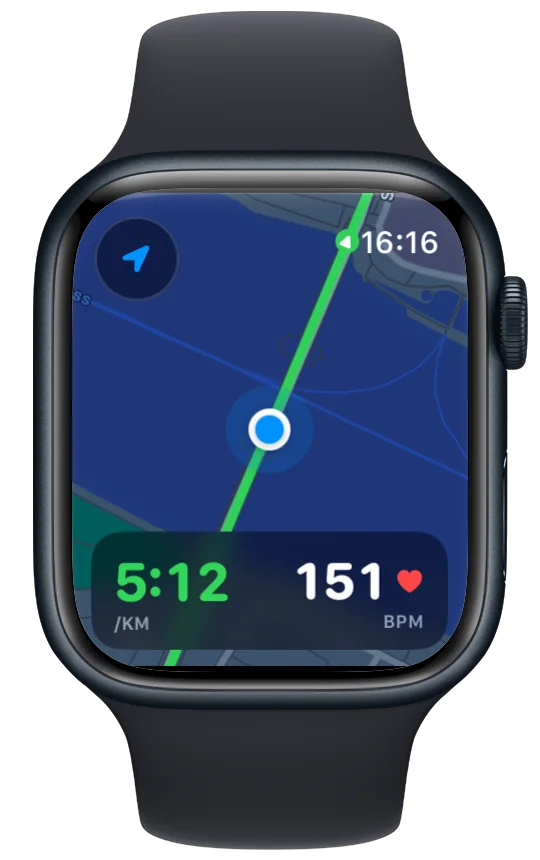
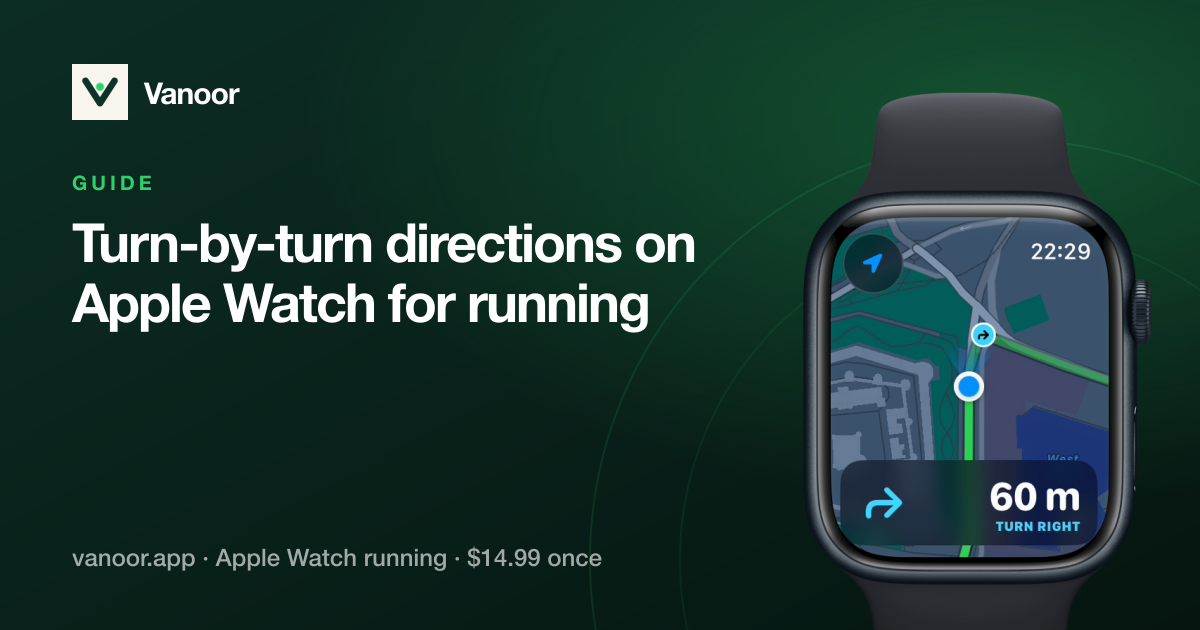
- The route line with your position and heading, distance markers every kilometre.
- Distance remaining and percent complete as live metrics on any data screen.
- Off-route warnings: a firm tap when you drift, so you only look down when you need to.
- Turn cues: a tap 60 m before each turn and another at the corner, worked out on the iPhone before the run (how turn-by-turn works).
- Back to Start, a breadcrumb of where you have actually been, for the day the trail is not where the map said.
Everything else a running watch does keeps working: pace, heart rate, splits, cues, and the run is saved to Apple Health when you finish. If you connected Strava, the upload happens the next time the Watch sees the iPhone.
Which Apple Watch models can do this?
Any Apple Watch with GPS running watchOS 10 or later. Series 7 and newer, SE (2nd gen) and every Ultra are comfortable; the Ultra's dual-frequency GPS helps under tree cover and between buildings. You do not need cellular, because navigation is entirely offline. As for battery, a half-marathon with the map screen on is well within a day's charge on any current model. For ultras, turn the always-on display off and use the map screen when you need it.
Honest limits
- No street names or spoken directions. You get the line, your dot and a warning when you leave it, which is how running watches work.
- Map coverage is a corridor, not the whole county. Wander far off the route and you are off the map, though the route line and Back to Start still work.
- Music needs to be synced to the Watch beforehand (Apple Music, Spotify downloads); streaming needs cellular.
The phone-free checklist
- Route "On Watch". The one thing that cannot be fixed at the trailhead.
- Music and podcasts downloaded to the Watch (Apple Music, Spotify and most podcast apps can sync episodes and playlists). Streaming needs cellular; downloads need nothing.
- Cellular only if you want it. Calls, messages and streaming need the cellular model with a plan. Navigation, GPS, heart rate and the run itself do not.
- Know what Emergency SOS needs. On a cellular Watch it works on its own. On a GPS-only Watch it needs the iPhone nearby or a known Wi‑Fi network, so on a remote trail with a GPS-only model, tell someone your route and your turnaround time the old-fashioned way.
- Apple Pay works offline for the coffee at the end; it was set up on the Watch itself, not borrowed from the phone.
Does GPS get worse without the phone?
No, if anything the opposite. When the iPhone is nearby, the Watch may lean on the phone's GPS to save its own battery. On its own it uses its built-in receiver, which is good on every model since Series 7 and noticeably better on the Ultra (dual-frequency) under trees and between tall buildings. Give it a fair start: begin the workout outside with a view of the sky and let the first fix settle for a few seconds before you press go. After that, pace will be steadier than the first hundred metres suggest. Why current pace jumps explains what the Watch is doing in those seconds.
What you give up
- Photos and calls on a GPS-only model (the cellular model keeps calls).
- Live sharing. Nobody can follow your dot in real time; the run uploads when you are back with the phone.
- Strava, until later. The run is saved to Apple Health on the Watch the moment you finish; if you connected Strava, the upload happens when the Watch next sees the iPhone. Nothing is lost in the gap.
- The big screen. Route planning, editing a workout and reading a long elevation profile are iPhone jobs; do them before you leave.
Battery on a phone-free run
Running alone, the Watch does its own GPS work, so it uses a little more battery than it would tethered to the phone, though that is small next to what the screen uses. A half marathon with the map page open is comfortably inside a full charge on any current model; for a long trail day, turn always-on off, keep the map on a page you swipe to when you need it, and read Apple Watch battery for long runs for the rest of the settings.
Running without your phone: quick answers
Can an Apple Watch navigate a route without the iPhone?
Yes, with an app that stores the route and its map on the Watch beforehand. Apple's Workout app cannot show a route to follow; Vanoor and a few other apps can, entirely offline.
Do I need the cellular model to run without my phone?
No. GPS, heart rate, navigation and music downloads all work on the GPS-only model. Cellular adds calls, streaming and stand-alone Emergency SOS.
Will my run still sync to Strava?
Yes, the next time the Watch is near the iPhone. The run itself is saved to Apple Health on the Watch immediately.
Does the Watch need Wi‑Fi during the run?
No. Nothing is fetched mid-run. Wi‑Fi only matters afterwards, for syncing, and even then the iPhone connection does that job.
Why not just carry the phone?
You can, and on some days you should. But a run with nothing in your pocket is a different run, and for many of us it is the reason we bought a Watch. With the route and map already on the wrist, you decide each morning whether the phone comes along.
Last checked 26 September 2026.
Sources
- Apple. Start a workout on Apple Watch (watchOS User Guide). support.apple.com
- Apple. Compare Apple Watch models (battery and GPS ratings). apple.com/watch/compare
Read 26 September 2026.
Related guides
Picked by shared topics.

Keep the Watch. Upgrade the run.
Vanoor: offline route navigation, race pacing and structured workouts on the Apple Watch you already own.
Get Vanoor on the App Store 7-day free trial · $14.99 once, no subscription · no account