 Vanoor
Guide
AI running plan on Apple Watch: turn a ChatGPT or Claude training plan into workouts your Watch runs
On this page
- Why plan your running with AI at all?
- The problem: a plan in a chat window cannot pace you
- How to run a ChatGPT or Claude running plan on Apple Watch
- ChatGPT running plan prompts that work
- What is in the file?
- Check the plan before you run it
- What happens on the Watch
- Other ways to get an AI running plan onto your wrist
- AI running plans — quick answers
- Sources
Asking an AI for a running plan is genuinely good. Tell ChatGPT or Claude your recent 10K time, which days you can train and the race you are aiming at, and in a few seconds you get a sensible week: an interval session, a tempo run, easy days, a long run that grows. It explains why, it reshuffles the week when your Thursday disappears, and it never gets tired of your questions.
The trouble starts when you lace up. The plan lives in a chat window, and your Apple Watch knows nothing about it. "6 × 800 m at 4:15/km with 90 s jog" becomes a screenshot you squint at between reps, or twelve steps you retype by hand into a workout builder. Most AI running plans die right there — not because the plan was bad, but because there was no good way to execute it on the wrist. This guide closes that gap: the AI writes the plan, and the Watch runs it, step by step, with the targets on screen.
Why plan your running with AI at all?
A chat assistant is not a coach who has watched you run for a year, but for most recreational runners it is a big step up from a generic PDF plan:
- It fits your week. Three runs or five, long run on Saturday or Sunday, a holiday in week 6 — say it and the plan bends around it.
- It uses your numbers. Give it a recent race time or your heart-rate zones and the paces come out personal instead of "run at a comfortable pace".
- It adapts on request. Missed a session, felt flat, got a cold — ask for the rest of the week again.
- It explains itself. Ask why the tempo is at that pace, and you learn something instead of just obeying a table.
Researchers who had experts grade ChatGPT's training programmes found them broadly sensible, and better the more detail the prompt contained — while still recommending a critical eye before you follow one [1]. That matches what runners report: the more you tell it, the better the plan.
The problem: a plan in a chat window cannot pace you
A training plan only works if you run the sessions as written, and interval sessions are exactly the ones that are hard to run from memory. Your options on Apple Watch have been:
- Remember it. Fine for "easy 8 km", hopeless for "3 × 2 km at 4:40/km, 90 s walk, then 1.5 km easy".
- Rebuild it by hand as a custom workout in Apple's Workout app, step by step — for every session, every week.
- Switch to a subscription coaching app that writes its own plan. That can be great, but you give up the AI conversation you already had, and you pay monthly.
What is missing is a bridge: the plan you already have, in a format the Watch can run.
How to run a ChatGPT or Claude running plan on Apple Watch
Vanoor turns the AI's answer into real workouts. There is no AI inside the app and no account — you use whichever assistant you like; Vanoor only reads the file it hands back.
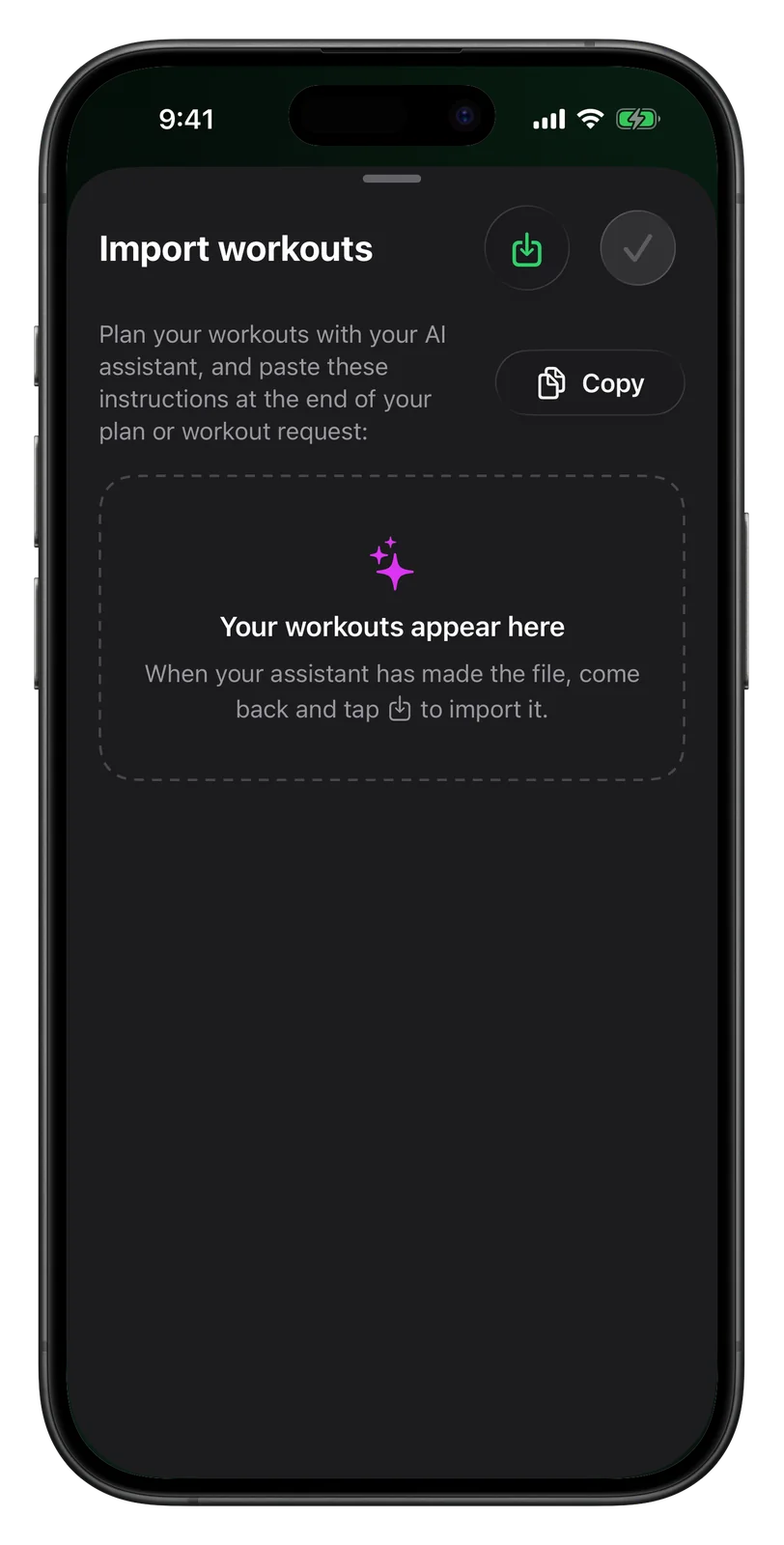
- Open the import screen. In Vanoor on your iPhone: My Workouts → + → Import Workouts.
- Copy the instructions. Tap Copy. This puts a short, exact description of the workout format on your clipboard.
- Ask your AI for the plan. In ChatGPT, Claude or Gemini, describe what you want (examples below), then paste the instructions at the end of your message.
- Download the file. The assistant replies with a
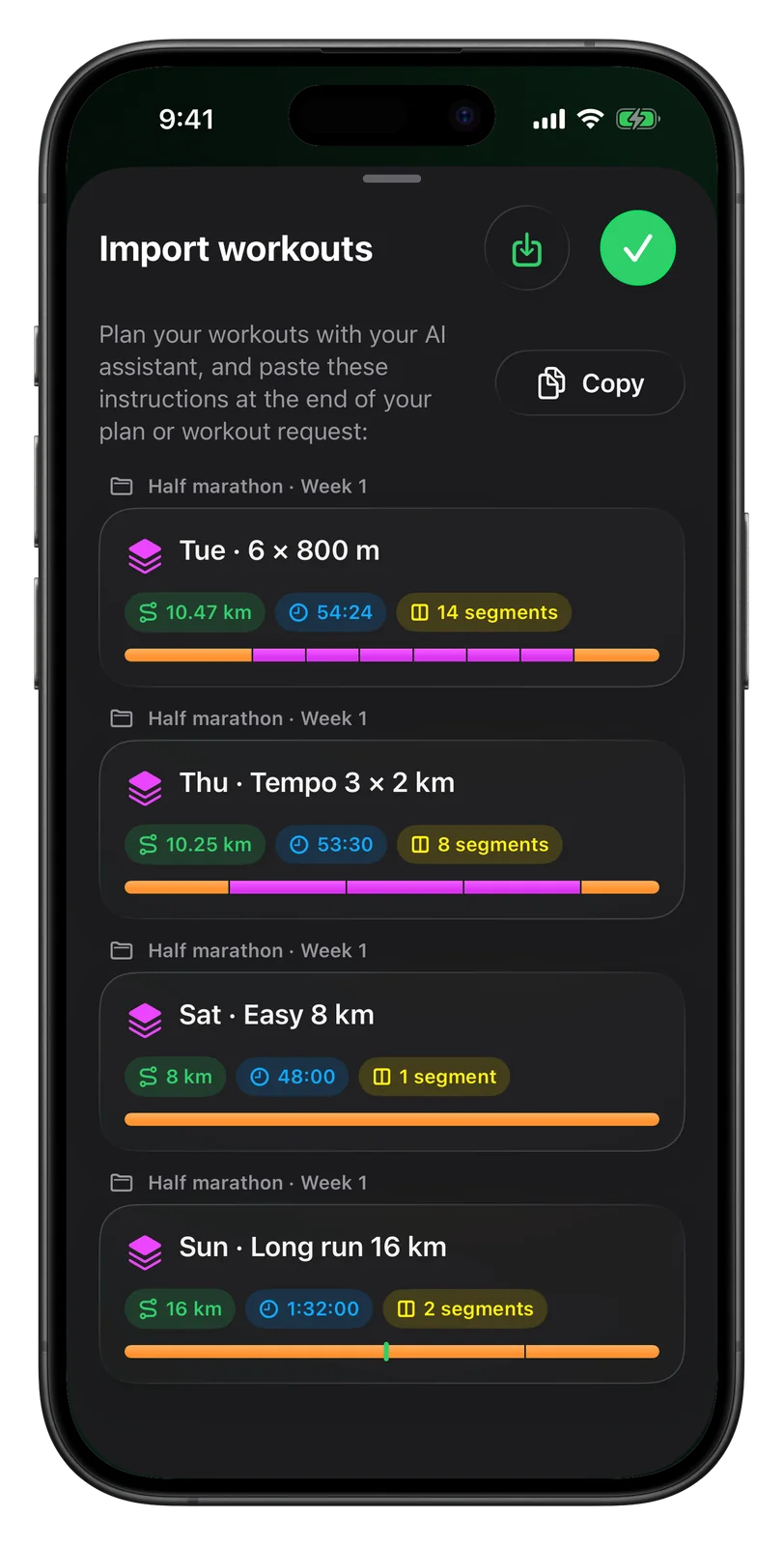
.vanoorfile. Save it to Files — or share it straight to Vanoor. - Import it. Back on the import screen, tap the import button and pick the file from Files. Every workout in the file appears as a card.
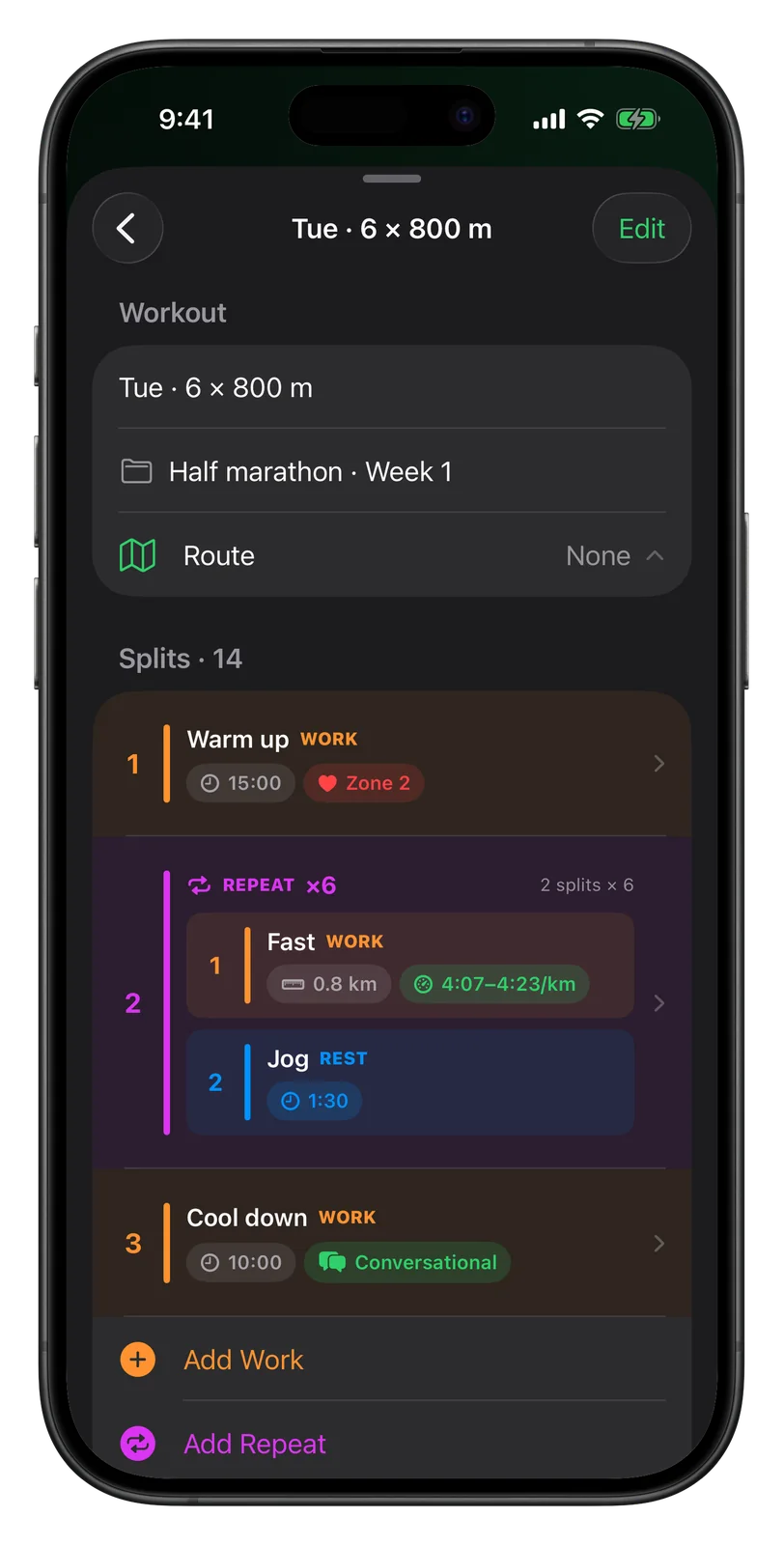
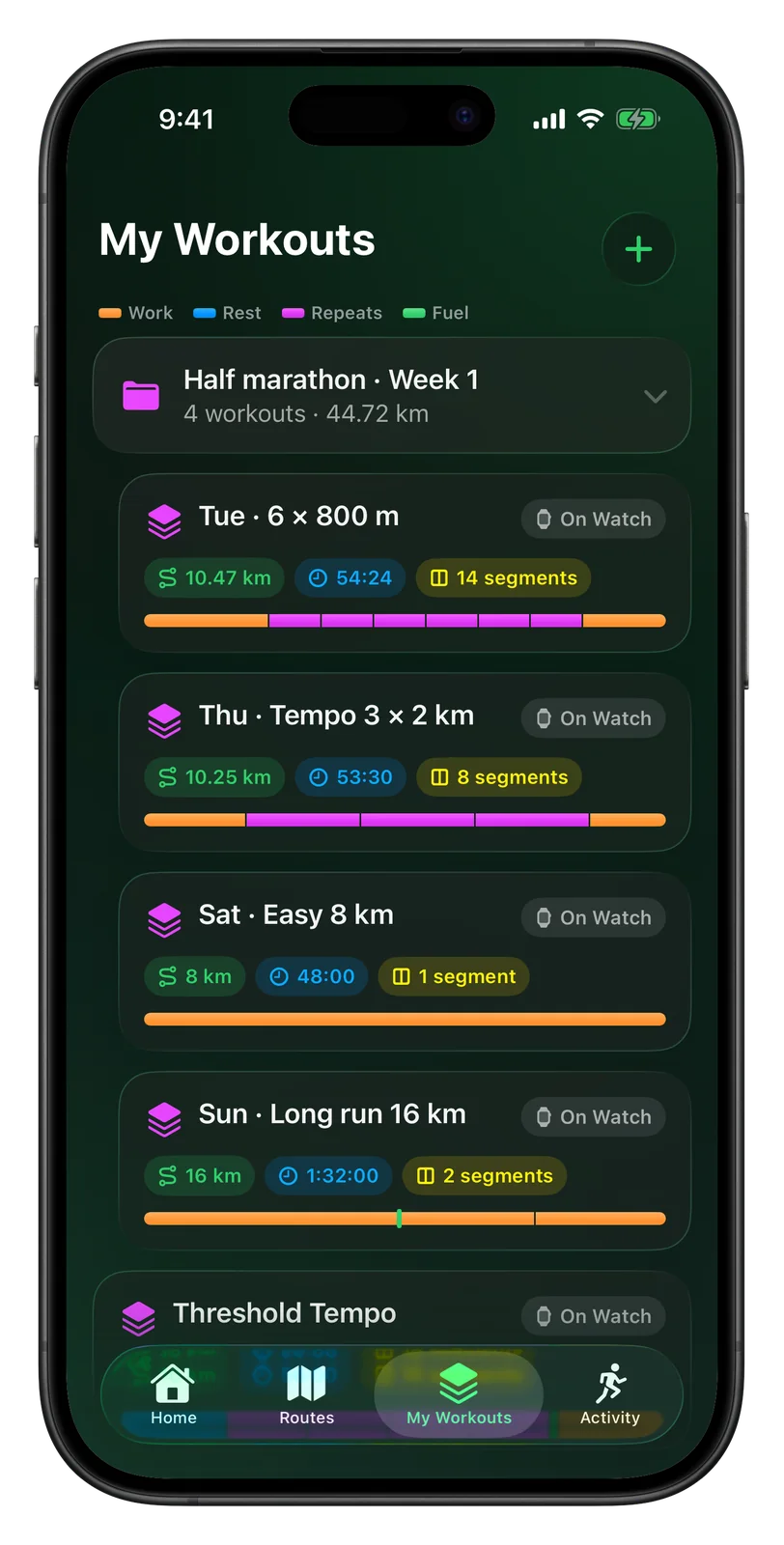
- Check, then save. Tap any card to open it in the workout builder and adjust a pace or a distance. Tap ✓, and the workouts are saved — the whole week in its own folder — and sync to your Apple Watch.
ChatGPT running plan prompts that work
The single biggest factor in a good AI running plan is what you tell it. Give it the facts a coach would ask for. Two prompts to copy — then paste Vanoor's instructions underneath.
A full training week
I'm training for a half marathon on 30 November, goal 1:45:00. Recent race: 10K in 47:30. I run 4 days a week (Tue, Thu, Sat, Sun), about 35 km a week now. Long run on Sunday. My max heart rate is 188. Make week 1 of the plan: one interval session, one tempo run, one easy run and one long run. Use my heart-rate zones for easy running and paces for the quality sessions. Put all workouts in a folder called "Half marathon · Week 1".
A single session
Give me one threshold session for tomorrow, about 60 minutes in total. My 10K pace is 4:45/km. Include a warm-up and a cool-down.
- Always include a recent race time (or a time trial). It is the difference between guessed paces and yours.
- Say how much you run now, not how much you would like to. The plan should start from today's volume.
- Ask for one week at a time and request the next one after you have run it — you can tell it how the week went.
- Heart-rate zones are fine too. "Zone 2" easy runs come through as zone targets on the Watch; give your max heart rate or your zone limits.
What is in the file?
A .vanoor file is plain JSON in a small, published format. You never have to read
it, but it is good to know it is nothing mysterious:
{ "schema": "vanoor.workout/1",
  "workouts": [ { "name": "Tue · 6 × 800 m", "folder": "Half marathon · Week 1",
    "steps": [
      { "type": "split", "label": "Warm up", "duration": 900, "target": "hr_zone", "zone": 2 },
      { "type": "repeat", "count": 6, "steps": [
        { "type": "split", "label": "Fast", "distance": 800,
          "target": "pace", "secondsPerKm": 255, "toleranceSeconds": 8 },
        { "type": "split", "label": "Jog", "duration": 90, "target": "open" } ] },
      { "type": "split", "label": "Cool down", "duration": 600, "target": "conversational" } ] } ] }
Distances are in metres, durations in seconds, paces in seconds per kilometre — or, if
Vanoor is set to miles, the instructions you copy say so: the file carries
"units": "imperial" with distances in miles and paces in seconds per mile, so the AI never
has to convert, and the Watch shows min/mi. Targets can be a
pace band, a heart-rate zone or range, "conversational" or none; there are repeat blocks and
nutrition reminders. If the AI makes a mistake — a negative distance, 200 repeats, a missing pace —
Vanoor says exactly which workout and which step is wrong, so you can ask the AI to fix that
one thing.
Check the plan before you run it
An AI will happily write a plan that looks great and is too much. Thirty seconds of checking catches the usual problems:
- Weekly distance. Compare the week's total with what you run now. In a large study of novice runners, those who increased their weekly distance by more than 30% had more of certain running injuries than those who progressed more gently [2]. If the AI jumps from 35 km to 50 km, ask it to build up more slowly. The folder shows the week's total.
- Easy really means easy. Most of the training of successful endurance athletes is done at low intensity — roughly 80% of sessions [3]. If three of four runs have a hard pace target, ask for more easy running.
- The paces match you. Interval pace a little faster than your 5K pace, tempo around your 10K–half-marathon pace, easy runs clearly slower. If a pace looks heroic, it probably is.
What happens on the Watch
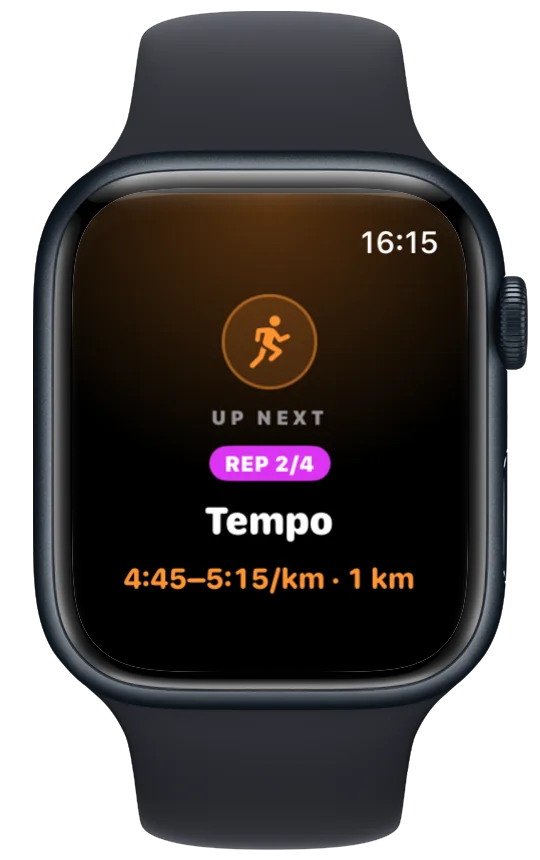
On the Watch the workouts appear under My Workouts, in the same order as on the iPhone, each with its folder name underneath. Start one and the Watch runs the plan for you:
- a full-screen card and a buzz before every step, so you know the target before you are in it;
- the pace band or heart-rate zone on screen with your live value inside it, plus the distance or time left in the step;
- recoveries counted down, repeats counted ("REP 3/6"), fuel reminders when the plan has them;
- the finished run saved to Apple Health — and to Strava if you connect it.
More on the running side in custom interval workouts on Apple Watch.
Other ways to get an AI running plan onto your wrist
| Plan comes from | Getting it onto the Watch | Cost | |
|---|---|---|---|
| Apple Workout app (custom workouts) | You | Build every session by hand | Free |
| AI coaching apps | The app's own coach | Automatic, inside that app | Usually a subscription |
| Vanoor | Any AI assistant you choose (or you) | Import the file; it syncs | $9.99 once, 7-day trial |
If you are happy with a coaching app's own plan, use it. The import route is for runners who like planning in their own AI chat — or who already have a plan there — and want the Watch to run it without another subscription.
AI running plans — quick answers
Can ChatGPT make a running plan?
Yes. Give it your recent race time, how often you run now, your available days and your goal, and it writes a week-by-week plan with paces or heart-rate targets. The detail you give decides the quality you get.
Are ChatGPT running plans good?
Usually sensible, sometimes too ambitious. Check the weekly distance against what you run now, make sure most runs are easy, and that the paces match your race times. Treat it as a draft.
Can I put a ChatGPT running plan on my Apple Watch?
Not directly — Apple Watch cannot read a plan from a chat. With Vanoor you copy a short set of
instructions into the chat, the AI returns a .vanoor file, and you import it as
workouts that sync to the Watch.
Does it work with Claude and Gemini too?
Yes. The instructions describe a plain file format, so any assistant that can create a file works. If yours can only reply with text, it answers with the JSON, and you can save it as a file.
Does it work in miles?
Yes. Set Settings → Units to Miles and the copied instructions ask the AI for miles and minutes per mile; every screen on the iPhone and the Watch shows miles, min/mi and feet.
Does Vanoor send my data to an AI?
No. Vanoor has no AI inside and no account. You talk to your assistant yourself; Vanoor only reads the file you import.
Can I import a whole marathon training plan at once?
Yes, up to 50 workouts per file, each placed in its folder. Importing week by week is usually better, though — you can tell the AI how the last week went.
Sources
- Washif JA, Pagaduan J, James C, Dergaa I, Beaven CM. Artificial intelligence in sport: exploring the potential of using ChatGPT in resistance training prescription. Biol Sport. 2024;41(2):209–220. doi:10.5114/biolsport.2024.132987
- Nielsen RO, Parner ET, Nohr EA, Sørensen H, Lind M, Rasmussen S. Excessive progression in weekly running distance and risk of running-related injuries: an association which varies according to type of injury. J Orthop Sports Phys Ther. 2014;44(10):739–747. doi:10.2519/jospt.2014.5164
- Seiler S. What is best practice for training intensity and duration distribution in endurance athletes? Int J Sports Physiol Perform. 2010;5(3):276–291. doi:10.1123/ijspp.5.3.276
Read 24 September 2026.
Related guides
Picked by shared topics.
Keep the Watch. Upgrade the run.
Vanoor — offline route navigation, race pacing and structured workouts on the Apple Watch you already own.
Get Vanoor on the App Store 7-day free trial · $9.99 once, no subscription · no account