 Vanoor
Guide
Strava not syncing with Apple Health? Why it happens, and how to fix it
On this page
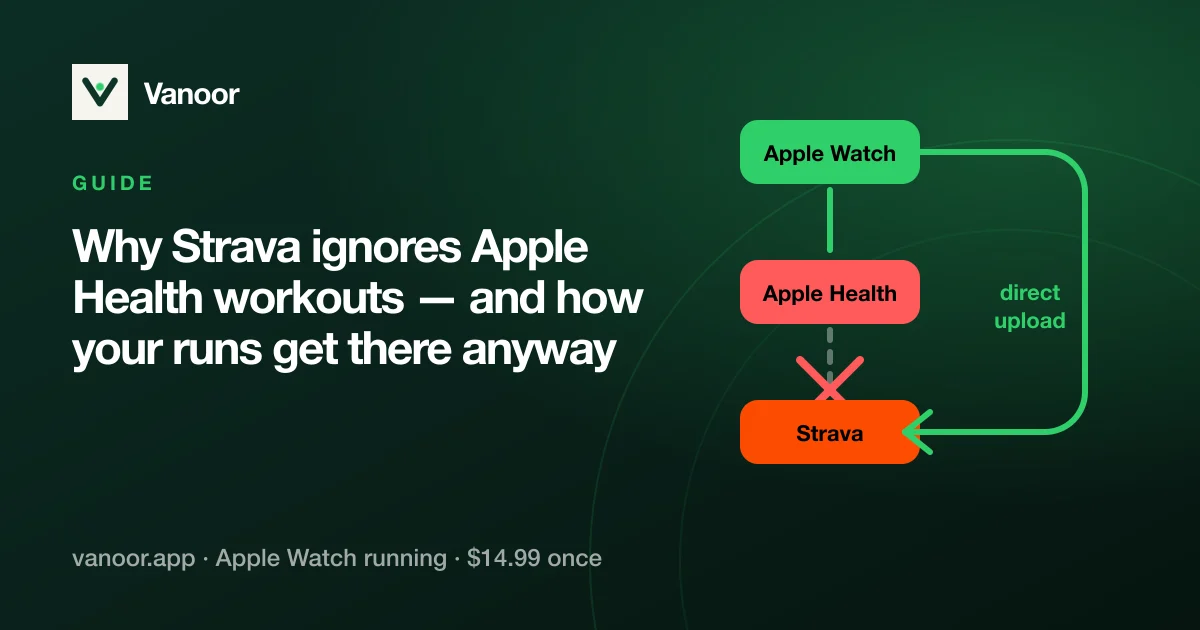
You finish a run and it's sitting right there in Apple Health, but Strava acts like it never happened. It's not a bug and it's not your settings: Strava's Apple Health integration only imports activities recorded with Apple's own Workout app. Strava's help centre says it outright: activities uploaded to Apple Health from a third-party app will not sync.
- Recorded with another app? Only Apple's Workout app syncs from Health. Runs from other apps never will (fix below).
- Older than 30 days? Strava only picks up Workout app activities from the past 30 days.
- Automatic Uploads off? Strava → You → settings → Manage Apps and Devices → Health → turn on Automatic Uploads, or tap Import next to the run.
- Missing permission? iPhone Settings → Apps → Health → Data Access and Devices → Strava → turn on Workouts & Routes (and heart rate).
- Shows as imported but isn't there? Strava rejects duplicates, so look for an activity with the same start time, delete it and import again.
Why Strava does this
Every workout in Apple Health carries the identity of the app that wrote it. Strava filters on that source and only accepts Apple's native Workout app, partly to avoid duplicate uploads from apps that already talk to Strava directly and partly by policy. No setting, permission, or metadata trick on the recording app's side changes this; Apple's own engineers confirm the filtering happens entirely on Strava's side.
The workarounds people try
| Approach | Result |
|---|---|
| Toggling Health permissions in Strava | No effect, because the source filter isn't permission-based |
| Bridge apps that re-upload Health workouts | Works, but adds a paid third app and manual friction |
| Exporting FIT/GPX files and uploading at strava.com/upload | Works, fully manual, every single run |
| The recording app uploading to Strava directly | Works automatically, and it's what serious running apps do |
How Vanoor handles it
Vanoor takes the last route. Connect your Strava account once in Settings, and every finished run is uploaded straight to Strava's API as a standard FIT file, with the full GPS route, heart rate and timing, moments after you save it on the Watch. Apple Health still gets its own copy. You need no bridge app and no manual exports, and there are no duplicates because each run is uploaded exactly once.
How to export an Apple Watch workout to Strava by hand
If you have a run in Apple Health that Strava will never pick up, because it was recorded with an app that does not upload directly, there are three ways to get it there, from least to most effort:
- Use the recording app's own export. Most serious running apps can share a finished run as a FIT or GPX file (Vanoor: open the run in Activity, tap share). AirDrop or save it, then upload at strava.com/upload or in the Strava app under Record → Upload activity. FIT keeps heart rate and cadence; GPX keeps the route and time only.
- A bridge app. Apps such as HealthFit or RunGap read workouts out of Apple Health and push them to Strava, automatically or on demand. They work, they cost a few dollars, and they add a third app to the chain.
- Re-record with Apple's Workout app. It is the only Health source Strava imports. That makes it a workaround more than an export, and it means giving up the app you chose.
The clean fix is still an app that uploads to Strava itself, once, right after the run, as described in the section above.
Heart rate travels with the upload, from the wrist or from a chest strap paired to the Watch, and a structured workout arrives on Strava with its laps intact. Setting a Watch up from scratch? Start with the complete guide to running with an Apple Watch.
How to connect Strava to Apple Health
This is the link that lets Workout app runs flow into Strava (and Strava activities into Health). From Strava's own help, as of September 2026:
- In the Strava app, open the You tab and tap the settings icon.
- Tap Manage Apps and Devices → Health, then the plus icon, then Connect.
- On Apple's Health Access screen, turn on Workouts & Routes (and any other data you want shared, such as heart rate).
- Back in Manage Apps and Devices → Health, turn on Automatic Uploads so Workout app runs go up without tapping Import.
- Optional: Send to Health copies Strava activities (for example from a bike computer) into Apple Health.
How to disconnect Strava from Apple Health
Two places, depending on what you want to stop:
- Stop Strava reading or writing Health data: iPhone Settings → Apps → Health → Data Access and Devices → Strava → Turn Off All. (In the Health app itself: your profile picture → Apps or Sources → Strava.)
- Stop uploads but keep the permission: Strava → settings → Manage Apps and Devices → Health → switch off Automatic Uploads and Send to Health.
Disconnecting stops future syncing only; activities already on Strava or in Health stay where they are. If you record with an app that uploads to Strava by itself (like Vanoor), that upload is a separate connection, managed inside that app.
What if I don't use Strava?
Nothing changes: runs save to Apple Health, show up in Vanoor's own Activity history with full charts and splits, and can be exported as FIT or GPX from any run's share menu whenever you need a file.
Strava and Apple Health: quick answers
Why is my Apple Watch workout not syncing to Strava?
Almost always because it was recorded with an app other than Apple's Workout app. Strava's Health sync ignores those on purpose. If it was a Workout app run, check that it is under 30 days old, that Automatic Uploads is on, and that Strava has the Workouts & Routes permission in Health.
Can Apple Fitness sync with Strava?
Workouts recorded with the Workout app, including ones you do alongside Apple Fitness+, sync through the Health connection above. The Fitness app's rings and awards do not go to Strava; only the workouts do.
Does Strava sync heart rate from Apple Health?
For Workout app activities, yes, if you allowed heart rate on the Health Access screen. For runs from other apps nothing syncs through Health at all, so the heart rate only arrives if that app uploads to Strava directly (Vanoor sends it inside the FIT file).
How do I get third-party Apple Watch runs onto Strava?
Use an app that uploads to Strava itself, a bridge app such as HealthFit or RunGap, or export a FIT file and upload it at strava.com/upload. The section above covers all three.
Will syncing create duplicate activities?
Strava refuses an activity with the same start time as one you already have, so the second copy is dropped. If an app uploads directly and you record the same run with the Workout app, you will see the duplicate rejected, so pick one path.
Last checked 25 September 2026.
Sources
- Strava. Apple Health and Strava — states that only activities recorded with the native Apple Workout app sync, and that workouts written to Health by other apps do not. support.strava.com
Read 25 September 2026.
Related guides
Picked by shared topics.
Keep the Watch. Upgrade the run.
Vanoor: offline route navigation, race pacing and structured workouts on the Apple Watch you already own.
Get Vanoor on the App Store 7-day free trial · $14.99 once, no subscription · no account